
HP Notebook 640 G4 Screen
KSh4,500.00
-
Brand-new HP Notebook 640 G4 Screen replacement
-
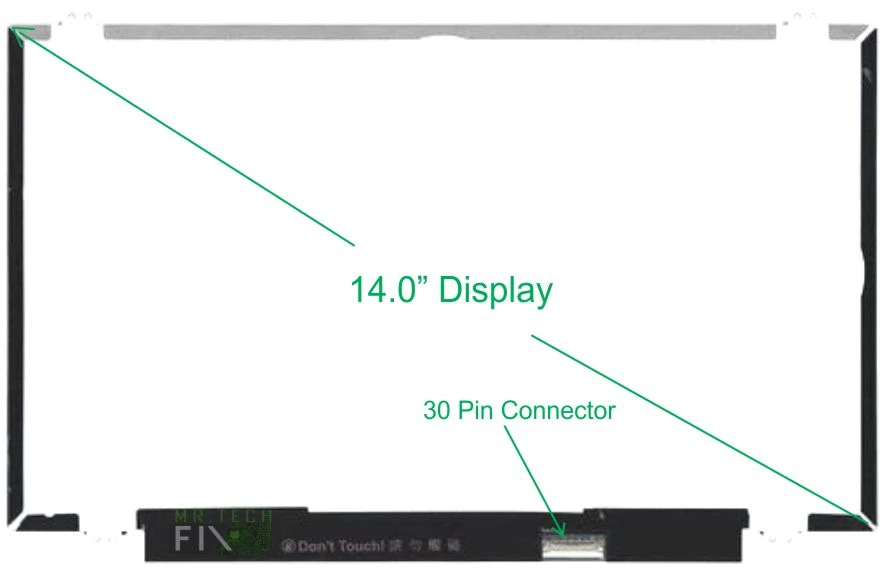
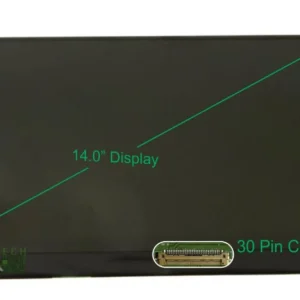
14.0-inch HD slim LCD display
-
Bottom-right 30-pin VGA connector
-
Non-touch, super-bright LED backlight
-
Clear, sharp high-definition visuals
-
Perfect compatibility with HP Notebook PC 640 G4
-
Free installation available after purchase
Description
HP Notebook 640 G4 Screen Complete Premium Display Replacement Guide
The HP Notebook 640 G4 Screen is a high-quality, slim LCD panel designed to restore your laptop’s clarity, brightness, and performance. Whether your current display is cracked, dim, flickering, or showing lines, replacing it with a genuine, high-definition screen ensures a fresh and vibrant viewing experience. This comprehensive product guide is crafted using advanced content AI techniques to help you understand everything you need to know before purchasing your replacement screen.
Why Choose the HP Notebook 640 G4 Screen Replacement?
Replacing your laptop display with an original HP Notebook 640 G4 Screen ensures optimal compatibility and long-term reliability. Many users experience issues like broken displays, washed-out colors, blackouts, or accidental liquid damage. A new replacement screen solves all these problems instantly.
This screen features a 14.0-inch HD slim LCD, delivering sharp visuals and clear resolution for daily tasks, office work, school, programming, and entertainment. With a super-bright LED backlight, you also get improved brightness and reduced power consumption.
Key Features of the HP Notebook 640 G4 Screen
14.0-Inch High-Definition Display
The HP Notebook 640 G4 Screen offers brilliant HD resolution that ensures crisp text, rich color contrast, and smooth visual output. Whether you’re multitasking, watching videos, browsing the web, or analyzing documents, the clarity remains excellent.
Slim, Lightweight, and Non-Touch
This is a slim, non-touch LCD panel that perfectly fits the HP Notebook PC 640 G4 chassis without adding weight. It is engineered for durability, stability, and long-term performance.
Bottom-Right 30-Pin VGA Connector
The screen uses a standard 30-pin connector located at the bottom right side. This connector type ensures compatibility with the HP Notebook 640 G4 motherboard and supports high-quality video transmission.
Super-Bright LED Backlight
The LED backlight guarantees uniform brightness, enhanced color output, and reduced battery usage. Compared to older CCFL screens, this modern LED offers better clarity and longevity.
Benefits of Installing the HP Notebook 640 G4 Screen
Instantly Fix Display Issues
A replacement screen immediately resolves:
-
Cracked or shattered display
-
Vertical or horizontal lines
-
Dim or flickering screen
-
Black display with sound
-
Liquid damage
-
Pressure marks
-
Dead pixels
Enhanced Viewing Experience
The clarity and color quality of the HP Notebook 640 G4 Screen make it perfect for:
-
Remote work
-
Online classes
-
Movie streaming
-
Photo editing
-
Office productivity
Improved Device Performance
A damaged screen can struggle to display properly, consume more power, or overwork the motherboard’s GPU output. Replacing it improves overall system efficiency.
Free Professional Installation (If Purchased From Us)
When you buy the HP Notebook 640 G4 Screen from us, you enjoy free installation by trained technicians. This ensures:
-
Zero risk of damaging internal components
-
Proper fitting and alignment
-
Professional testing before handover
Our team has over 10 years of experience in laptop repairs and screen replacements.
How to Know If This HP Notebook 640 G4 Screen Is Compatible With Your Laptop
Check the following:
-
Model must be HP Notebook 640 G4
-
Original screen size: 14.0 inches
-
Connector: 30-pin (bottom right)
-
Display type: LCD, Non-touch slim
-
Resolution: HD
If all match, this is the exact replacement screen you need.
Why Buy From Us?
-
100% genuine replacement parts
-
Professional testing before use
-
Free installation
-
Warranty available
-
Affordable pricing
-
Pick-up & drop-off services
We also supply laptop parts including keyboards, batteries, hinges, and more.
Tips to Extend the Life of Your New HP Notebook 640 G4 Screen
-
Avoid pressing the screen with sharp objects
-
Do not close the lid using one corner—use the center
-
Clean with microfiber cloth only
-
Use a laptop sleeve during travel
-
Keep liquids away from the device
-
Avoid placing heavy items on the laptop
These habits ensure your screen stays bright and clear for a long time.
Reviews
There are no reviews yet.