
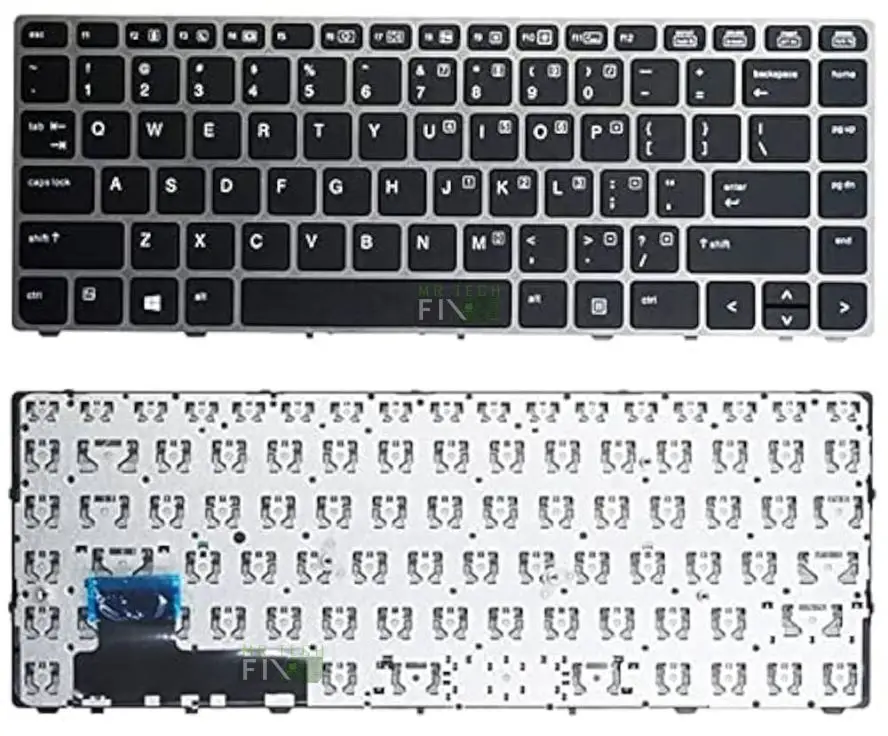
HP Folio Elitebook 9470 Keyboard
KSh1,800.00
-
Brand-new HP EliteBook Folio 9470m Keyboard Replacement
-
U.S.A QWERTY layout – Black keys with Silver frame
-
Top-fit design with screw-hole alignment for secure installation
-
Durable, responsive keys for fast and accurate typing
-
Perfect fit for EliteBook Folio series (9470m model)
-
Easy installation: open the laptop, remove keyboard screws, lift gently, disconnect ribbon cable, and replace
-
Ideal for worn-out, liquid-damaged, missing, non-functional, or self-pressing keys
Description
HP Folio Elitebook 9470 Keyboard Replacement
HP Folio Elitebook 9470 Keyboard is the perfect high-quality replacement for anyone using the HP EliteBook 9470m and experiencing keyboard problems. Whether your keys are not working, some buttons are missing, the keyboard is typing by itself, or liquid damage has caused malfunction, this replacement restores your laptop to full performance. The HP EliteBook 9470 Keyboard is built with premium materials, offers smooth key response, and matches the original design and feel of the 9470m series.
This replacement is brand new, features a USA QWERTY layout, and comes in a Black & Silver Frame that fits perfectly with the EliteBook’s sleek professional design. Its top-fit construction with screw holes ensures stable installation with no gaps, misalignment, or pressure points.
Why the HP Folio Elitebook 9470 Keyboard Is the Best Replacement Option
The HP Folio Elitebook 9480 Keyboard is designed specifically for long-term durability and perfect compatibility with the EliteBook Folio 9470m. Unlike generic replacement keyboards, this model ensures easy installation, accurate key spacing, and long-lasting performance similar to the original factory keyboard.
i) Engineered for HP EliteBook Folio 9470m
The HP EliteBook 9480 Keyboard matches the original keyboard dimensions, screw placement, ribbon cable position, and key spacing. This ensures:
-
Perfect fitting
-
No need for modification
-
Smooth typing
-
Better durability
ii) Smooth, Comfortable, and Accurate Typing
Typing feels natural and consistent thanks to high-quality key switches. Keys respond quickly, making it ideal for:
-
Office use
-
Students
-
Programmers
-
Business professionals
iii) Built with Strong and Durable Materials
Because EliteBooks are used in demanding environments, the HP EliteBook 9470 Keyboard is designed for endurance. It is resistant to:
-
Long hours of typing
-
Pressure on the frame
-
Key wear
-
Short circuits (after minor spills)
How to Install the HP Folio Elitebook 9470 Keyboard (Step-by-Step)
Installing the HP Folio Elitebook 9470 Keyboard on the EliteBook Folio 9470m is simple and takes less than 15 minutes.
Step 1 – Open the Laptop
Turn off the laptop, remove the battery (if possible), and open the back cover.
Step 2 – Locate Keyboard Screws
Inside the laptop, you will see screws marked “K” or “Keyboard.” These are the screws you must remove.
Step 3 – Remove the Old Keyboard
Unscrew the keyboard, gently lift it from the top side, and disconnect the ribbon cable.
Step 4 – Install the New HP EliteBook 9470 Keyboard
Attach the ribbon cable, place the new keyboard into position, tighten the screws, and close the laptop.
Your laptop will instantly regain full typing capability.
Common Problems Fixed by the HP Folio Elitebook 9470 Keyboard
a) Some Keys Not Working – Keys that don’t respond are usually caused by damaged tracks. The new keyboard fixes this completely.
b) Ghost Typing or Keys Pressing by Themselves – This is caused by internal short circuits. Replacing the keyboard solves it instantly.
c) Missing Keys or Broken Keycaps – If your keys are missing, loose, or broken, the replacement restores your typing accuracy.
d) Liquid Damage Issues – Spilled tea, water, juice, or coffee may destroy circuits. A replacement is the only permanent solution.
Tips to Make Your HP Folio Elitebook 9470 Keyboard Last Longer
-
Avoid eating and drinking near your laptop
-
Use compressed air to clean dust from the keyboard
-
Close the laptop when traveling
-
Avoid pressing keys too hard
-
Use a silicone keyboard protector for dusty environments
FAQ – HP Folio Elitebook 9470 Keyboard
Q} Is the HP EliteBook 9470 Keyboard compatible with 9470m?
A} Yes. It is designed specifically for HP EliteBook Folio 9480m.
Q}Is this a brand-new keyboard or refurbished?
A} It is 100% brand new.
Q} Does it come with the USA QWERTY layout?
A} Yes, the layout is USA Standard (QWERTY).
Q} How long does installation take?
A} Usually 10–15 minutes.
Q} Does it require professional tools?
A} Just a small screwdriver.
Reviews
There are no reviews yet.