
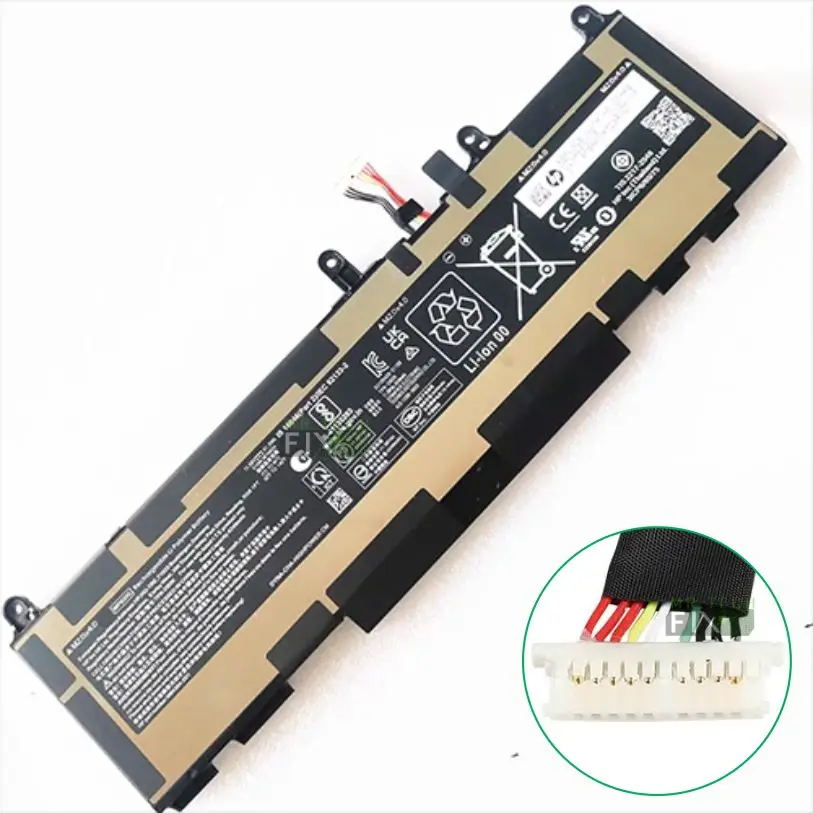
HP EliteBook 830 G10 battery
KSh6,000.00
HP EliteBook 830 G10 Battery – High-Capacity WP03XL Replacement
-
Series: HP EliteBook Folio
-
Part Number: WP03XL
-
Condition: Brand New
-
Type: Inbuilt Lithium Battery
-
Capacity: 11.58v / 51.3Wh
-
Fitting: Grooved design for perfect locking fit
-
Installation: Remove bottom lid → Unscrew battery → Disconnect cable → Install new one
-
Warranty: 6 Months
Description
HP EliteBook 830 G10 Battery Replacement – High-Performance WP03XL Long-Life Upgrade
The HP EliteBook 830 G10 Battery is the perfect high-performance replacement for users experiencing reduced battery life, sudden shutdowns, swelling, charging issues, or overheating on their EliteBook G10 series laptop. Designed to meet the exact specifications of the original WP03XL battery, this replacement restores strong power efficiency, long hours of use, and stable performance for professional work, remote tasks, online classes, and travel.
With a large 11.58v / 51.3Wh capacity, the HP EliteBook 830 G10 Battery delivers excellent runtime and fast power recovery, ensuring your laptop performs like new again.
Why Choose the HP EliteBook 830 G10 Battery Replacement?
Replacing your old or worn battery with a HP EliteBook 830 G10 Battery ensures safe operation, extended usage time, and long-term reliability. The battery uses high-quality lithium cells that provide better temperature control, energy efficiency, and slower wear over time.
100% Compatible WP03XL Battery
This battery is engineered specifically for:
-
HP EliteBook 830 G10 Series
-
Laptops using WP03XL battery type
It matches HP’s original power specifications and connector layout, ensuring seamless installation and flawless performance.
High Capacity for Longer Working Hours
The 51.3Wh capacity ensures extended laptop use without constant charging. Perfect for:
-
Office professionals
-
Students
-
Travellers
-
Remote and field workers
Whether running heavy software or multitasking, the HP EliteBook 830 G10 Battery delivers dependable power.
Built with Premium Lithium Technology
The inbuilt lithium battery offers:
-
High energy density
-
Longer charge cycles
-
Better heat management
-
Protection against overcharge, overcurrent, and short circuits
This ensures extended lifespan and maximum safety.
Perfect Fit with Grooved Design for HP EliteBook 830 G10 Battery
This replacement uses a grooved fit design, ensuring:
-
Perfect alignment with the battery compartment
-
Secure locking into the EliteBook frame
-
No bulges or loose fitting
-
Smooth and tight installation
The battery fits exactly like the original HP battery.
Step-by-Step Installation for HP EliteBook 830 G10 Battery
Replacing the WP03XL HP EliteBook 830 G10 battery is easy BUT YOU MUST BE KNOWING WHAT YOU DOING this is to avoid harming yourself or damaging the laptop.
Step 1 – Open the Bottom Lid
Turn off the laptop, unplug the charger, and remove the bottom cover.
Step 2 – Locate Battery Screws
The internal screws holding the battery are easy to identify.
Step 3 – Remove the Screws
Unscrew all screws securing the WP03XL battery.
Step 4 – Disconnect Battery Cable
Gently disconnect the battery connector from the motherboard.
Step 5 – Install the New HP EliteBook 830 G10 Battery
Place the new battery, tighten all screws, reconnect the cable, and close the laptop.
the process will take around 30 minutes and you will be done — the laptop will now deliver strong, stable power like new.
Problems Solved by Replacing the HP EliteBook 830 G10 Battery
1) Fast Battery Drain – If your battery drops from 100% to 10% quickly, this new replacement fixes the issue.
2) Sudden Shutdowns Even at 40–50% – Voltage drops in worn batteries cause unexpected shutdowns — a new battery solves this instantly.
4) Battery Not Charging – Faulty internal circuits or worn cells stop batteries from charging. Replacement is the only solution.
5) Overheating or Swollen Battery – Swollen batteries are dangerous. The new WP03XL battery restores safety.
6) Low Battery Health Warning – If Windows shows “Consider replacing your battery,” this new HP EliteBook 830 G10 Battery is the correct fix.
Tips to Increase the Lifespan of Your HP EliteBook 830 G10 Battery
-
Do not keep the laptop plugged in 24/7
-
Avoid exposing the laptop to heat
-
Use an original or high-quality HP charger
-
Perform battery calibration occasionally
-
Avoid draining the battery to 0% regularly
FAQ – HP EliteBook 830 G10 Battery (WP03XL)
Q1) Is this battery compatible with the HP EliteBook 830 G10?
Yes, it is the exact replacement for the HP EliteBook 830 G10.
Q2) What is the battery model number?
WP03XL.
Q3) What is the capacity?
11.58V, 51.3Wh.
Q4) Is this an original or replacement battery?
It is a high-quality replacement built to OEM standards.
Q5) Does it have a warranty?
Yes — 6 months warranty.
Reviews
There are no reviews yet.