
HP ProBook 8440 Keyboard
KSh1,800.00
-
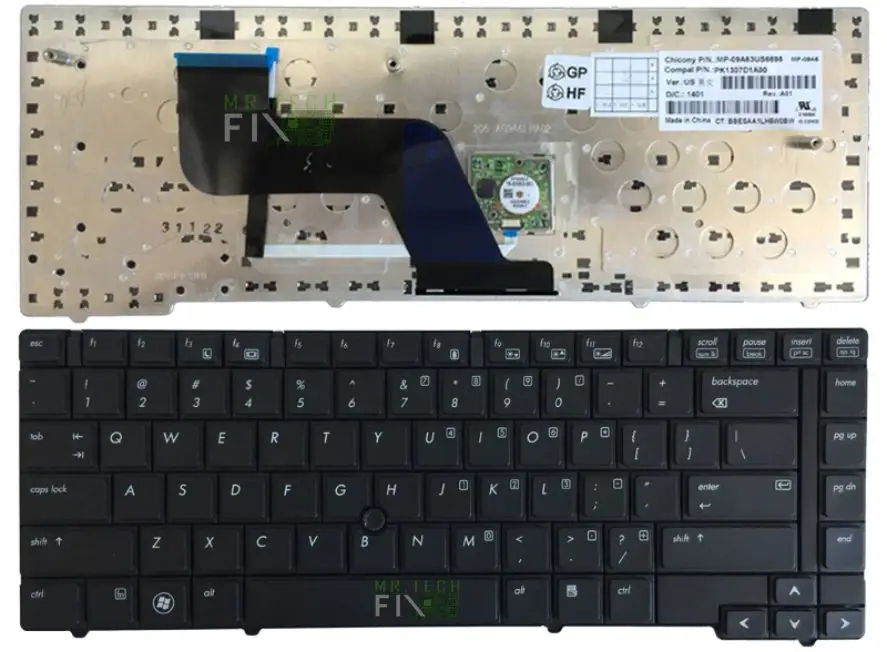
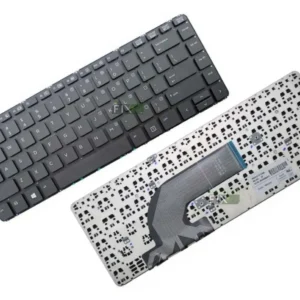
Brand-new OEM-grade HP ProBook 8440p keyboard.
-
USA layout (QWERTY) with high-quality key printing.
-
Durable black keys with elegant silver frame.
-
Smooth key response and long-lasting key life.
-
Simple Screw, plug-and-play installation.
-
Perfect replacement for damaged, missing, or unresponsive keys
-
Compatible exclusively with HP ProBook 8440p laptop
Description
HP ProBook 8440p Keyboard Replacement – High-Quality USA Layout
Looking for a reliable HP ProBook 8440p keyboard replacement? This brand-new, premium-quality keyboard is designed specifically for HP ProBook 8440p laptops. It features a USA layout, durable black keys, and a sturdy silver frame for a clean professional look.
Engineered with responsive keys, long key-life, and smooth typing feedback, this keyboard restores your laptop’s productivity whether the old keyboard suffered liquid damage, missing keys, stuck keys, or failed buttons. It is a non-backlit model, identical to the original factory design.
Installation is straightforward, making it suitable for technicians and DIY users looking to restore original typing performance.
Why Choose This HP ProBook 8440 Keyboard Replacement?
- 100% compatible with HP ProBook 8440p Keyboard only.
-
Perfect OEM-match design.
-
Durable plastic structure for long-lasting use.
-
Precise responsiveness for comfortable typing.
-
Ideal for office, school, and business laptops.
Frequently Asked Questions (FAQ) On HP ProBook 8440 Keyboard
1. Is this keyboard compatible with HP 8440w or other models?
No. This keyboard is specifically designed for HP ProBook 8440 Keyboard only.
2. Does it have backlight?
No, this is a non-backlight keyboard, same as the original 8440p version.
3. Can I install it myself?
Yes. If you’re comfortable opening the laptop, installation takes about 10–15 minutes. Otherwise, seek a professional technician.
4. What problems does replacing the keyboard fix?
-
Missing or broken keys
-
Liquid-damaged keyboard
-
Unresponsive keys
-
Keys typing wrong characters
-
Sticky or hard-press keys
5. Is the silver frame included?
Yes, the keyboard comes with a black key surface and silver frame, ready for installation.
Tips to Prevent Keyboard Damage
-
Avoid eating and drinking near the laptop
-
Use a keyboard protector to prevent dust accumulation
-
Shut down the laptop immediately after accidental spills
-
Clean keys gently with a soft brush—avoid liquids
-
Handle keys carefully to prevent popping or bending
Reviews
There are no reviews yet.