
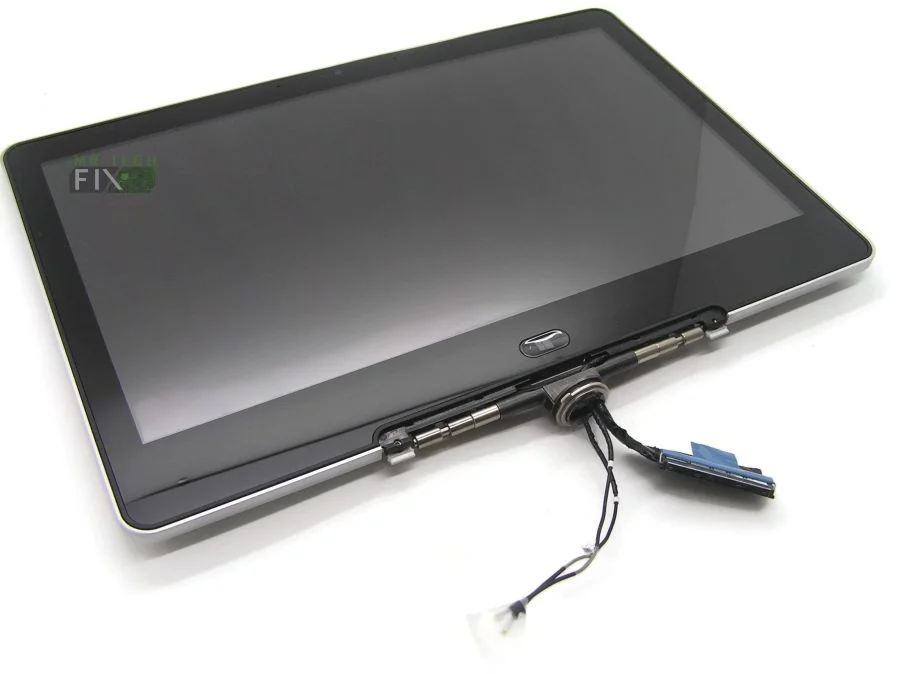
HP Revolve 810 Screen Replacement
KSh8,500.00
- Series: Revolve
- Model: 810 Series
- Size: 11.6 inch’s
- Resolution: High definition (HD)
- Type: LCD, Touchscreen
- Backlight Lamp: Super bright LED
Description
Premium HP Revolve 810 Screen Replacement – High-Quality, Clear & Responsive Display
HP Revolve 810 Screen Replacement
The HP Revolve 810 Screen Replacement is the perfect solution for users whose laptop display has suffered damage, developed lines, lost touch sensitivity, or become unusable due to cracks or malfunction. This replacement screen is engineered to meet the original HP specifications, offering brilliant clarity, smooth touch responsiveness, and reliable durability. Whether your screen is flickering, displaying distorted graphics, or physically broken, this high-quality replacement restores your laptop to like-new visual performance.
Designed for the HP Revolve 810 Series, this 11.6-inch screen combines HD resolution, LCD technology, touchscreen capability, and a super bright LED backlight for exceptional brightness and energy efficiency. It is perfect for business users, students, and professionals who depend on crisp visuals and responsive touch input for daily tasks. With premium-grade components, this screen ensures accurate colors, sharp images, and smooth touch performance that matches the original display.
HP Revolve 810 Screen Replacement – Key Features
Perfect Compatibility with the HP Revolve Series
The HP Revolve 810 Screen Replacement is manufactured to fit perfectly with all models within the Revolve 810 Series. It integrates seamlessly with the device’s hinges, bezel, back cover, and touchscreen connectors. Full compatibility includes:
-
Series: HP Revolve
-
Model: 810 Series
-
Screen Size: 11.6 inches
-
Resolution: High Definition (HD)
-
Display Type: LCD Touchscreen
-
Backlight: Super Bright LED
This ensures a smooth installation process and flawless performance after replacement.
High Definition Visual Clarity
With its HD resolution, this screen delivers exceptional clarity for:
-
School work
-
Business presentations
-
Streaming videos
-
Browsing
-
Graphic work
-
Document editing
The colors are vivid, text is sharp, and brightness levels are strong enough for various lighting environments. The LED backlight ensures energy efficiency while producing a vibrant and crisp display experience.
Why Choose the HP Revolve 810 Screen Replacement?
Fixes All Major Display Problems
If your HP Revolve 810 is showing any of these symptoms, this replacement screen will restore perfect display functionality:
-
Cracked or shattered screen
-
Flickering display
-
Touchscreen not responding
-
Black spots or dead pixels
-
Horizontal or vertical lines
-
Dim screen or backlight failure
-
Ghost touch issues
-
Distorted colors or brightness
Installing a brand-new screen provides a fresh, smooth, and clear viewing experience, bringing your device back to full working condition.
Ultra-Responsive Touchscreen
The integrated touchscreen responds accurately to gestures, taps, scrolling, and zooming, making multitasking easier and more intuitive. It maintains the original touch sensitivity of the HP Revolve 810, ensuring fluid performance for both casual and professional use.
Product Specifications
-
Series: HP Revolve
-
Model: 810 Series
-
Size: 11.6 inches
-
Resolution: HD
-
Display Type: LCD Touchscreen
-
Backlight Type: Super Bright LED
Benefits of the HP Revolve 810 Screen Replacement
-
Brings your laptop display back to brand-new clarity
-
Touchscreen works smoothly and accurately
-
HD resolution offers sharp, crisp visuals
-
LED technology ensures low power consumption
-
Durable and built to last
-
Perfect for replacing cracked, dim, or unresponsive screens
-
Restores productivity for school, business, and entertainment
-
Provides excellent color accuracy and brightness
This replacement screen is ideal for anyone who relies on clear visuals and responsive touch functionality.
Installation Tips for HP Revolve 810 Screen Replacement
Recommended Installation Procedure
-
Power off the laptop completely and remove the charger.
-
Detach the back cover or bezel surrounding the screen.
-
Unscrew the damaged screen from the hinge brackets.
-
Disconnect the touchscreen and display cables carefully.
-
Connect the new screen’s cables securely.
-
Mount the new screen and tighten the screws.
-
Reattach the bezel or back cover.
-
Power on the laptop and test the display and touch functionality.
If you’re not experienced with screen replacements, a professional technician is recommended to avoid damaging delicate components.
H2: Frequently Asked Questions (FAQ)
Q1: Is this screen original?
It is an OEM-quality replacement made to meet HP’s original specifications.
Q2: Does the touchscreen work like the original?
Yes, it offers full touchscreen functionality identical to the factory-installed screen.
Q3: Will this fit all HP Revolve 810 models?
Yes, it is designed specifically for the entire HP Revolve 810 Series.
Q4: Is the display bright enough for outdoor use?
The super bright LED backlight provides excellent brightness for both indoor and outdoor environments.
Reviews
There are no reviews yet.