
HP EliteBook 8440 Screen Replacement
KSh4,000.00
-
- Series: EliteBook
- Model: 8440p
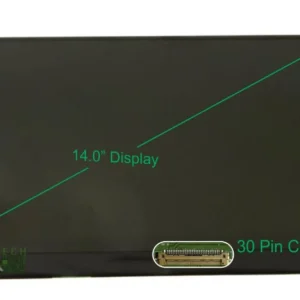
- Size: 14.0 inch’s
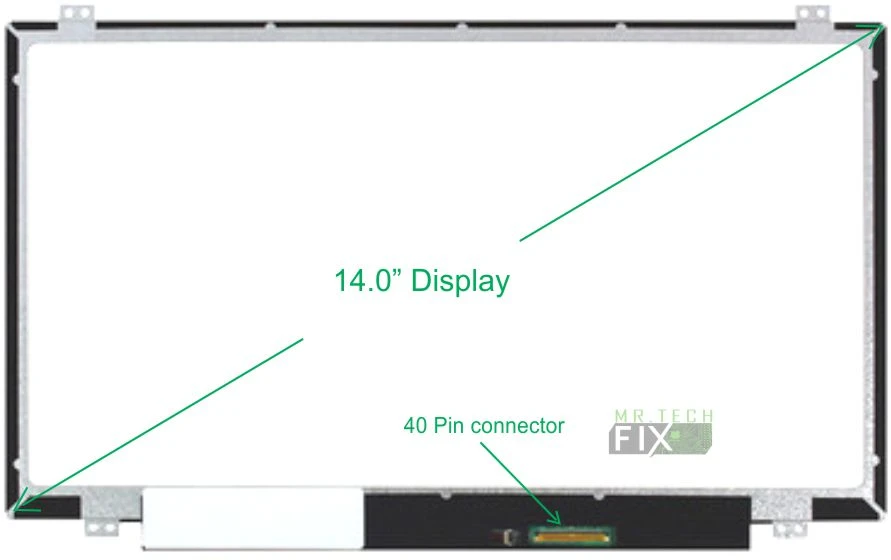
- VGA Connector: Bottom Right 40 Pins
- Resolution: High definition (HD)
- Type: LCD, Non Touchscreen
- Backlight Lamp: Super bright LED
Description
Premium HP EliteBook 8440 Screen Replacement – Restore Crystal-Clear Visual Performance
HP EliteBook 8440 Screen Replacement is the perfect solution for users experiencing display problems such as cracks, flickering, dim brightness, lines on the screen, dead pixels, or distorted images. Specially designed for the HP EliteBook 8440p laptop, this high-quality LCD screen restores your device’s clarity, brightness, and visual accuracy. Whether you use your laptop for professional work, online meetings, entertainment, or study, the HP EliteBook 8440 Screen Replacement ensures stunning and reliable display performance.
Why Choose HP EliteBook 8440 Screen Replacement?
The HP EliteBook 8440 Screen Replacement is engineered to match the original factory display specifications. Over time, laptop screens may break, dim, discolor, or fail due to drops, pressure, internal faults, or aging components. Replacing the damaged screen restores full HD clarity, vibrant colors, and overall visual comfort.
This replacement screen is manufactured using high-quality materials, guaranteeing durability, easy installation, and long-lasting brightness.
Key Features of the HP EliteBook 8440 Screen Replacement
HD (High Definition) Display Resolution
Enjoy crisp visuals, sharp text, and vibrant color reproduction with the HP EliteBook 8440 Screen Replacement. Its HD resolution ensures an excellent viewing experience whether you’re multitasking, streaming videos, editing documents, or browsing the web.
Super Bright LED Backlight
This replacement screen features a Super Bright LED backlight, providing superior brightness while consuming less power. LED screens deliver more consistent lighting, longer lifespan, and clearer visuals compared to older CCFL screens.
40-Pin VGA Connector – Bottom Right Position
Designed for perfect compatibility, the screen includes a bottom-right 40-pin VGA connector, ensuring seamless installation and stable performance. The connector location and pin configuration match the original HP EliteBook 8440 display.
Slim LCD, Non-Touchscreen Design
The HP EliteBook 8440 Screen Replacement is a slim, non-touch LCD panel, making it lightweight and sleek. Its slim profile fits perfectly into the laptop’s display frame without requiring any modification.
Perfect Fit for HP EliteBook 8440 Screen Replacement
This screen is engineered precisely for:
-
Series: EliteBook
-
Model: HP EliteBook 8440p
-
Size: 14.0 inches
-
Type: LCD, Non Touchscreen
-
Resolution: High Definition (HD)
-
Backlight: Super Bright LED
-
Connector: 40-pin bottom-right
Its OEM-level design ensures that every component fits and performs exactly like the original screen.
Benefits of Installing an HP EliteBook 8440 Screen Replacement
Restore Display Quality
If your current screen is cracked, dim, or discolored, the HP EliteBook 8440 Screen Replacement instantly restores full functionality and visual clarity.
Boost Your Productivity
A damaged display makes working uncomfortable and can slow you down. A new screen ensures smooth workflow, better concentration, and reduced eye strain.
Cost-Effective Upgrade
Rather than replacing the entire laptop, installing a new screen gives your device a fresh lease of life at an affordable cost.
Long-Term Durability
Built from premium components, this screen guarantees long-lasting performance, resistance to pressure, and stable brightness over time.
Signs You Need an HP EliteBook 8440 Screen Replacement
You may need a new screen if you experience:
-
Cracks or visible physical damage
-
Lines, flickers, or black bars on the display
-
Dim or uneven brightness
-
Dead or stuck pixels
-
Color distortion or fading
-
Screen not lighting up despite powering on
-
Pressure marks or black ink-like patches
When you notice any of these issues, the HP EliteBook 8440 Screen Replacement is the best solution to restore perfect display quality.
How to Maintain Your HP EliteBook 8440 Screen Replacement
Use a Protective Laptop Sleeve
Prevents damage from accidental drops and pressure.
Clean the Screen Regularly
Use a microfiber cloth and avoid harsh chemicals that may damage the LCD panel.
Open and Close the Lid Carefully
Apply gentle force when opening or closing the laptop to avoid stressing the hinges.
Avoid Placing Heavy Objects on Top
Too much pressure on the laptop lid can crack the screen.
Conclusion HP EliteBook 8440 Screen Replacement
The HP EliteBook 8440 Screen Replacement offers a reliable, high-quality solution for restoring your laptop’s visual performance. With its HD resolution, slim design, durable LED backlight, and perfect compatibility with the 8440p model, this screen ensures your device looks and works like new again. Enjoy bright, clear, and vibrant visuals once more with this professional-grade replacement screen.
Reviews
There are no reviews yet.