
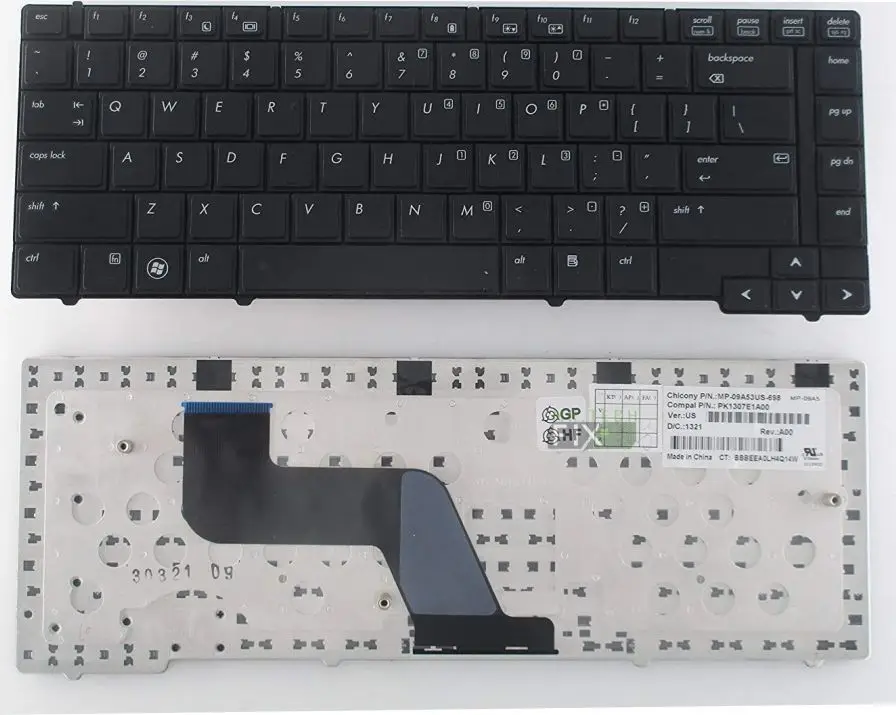
HP ProBook 6440b 6445b and 6450b Keyboard
KSh1,800.00
-
Brand-new replacement keyboard for HP ProBook 6440b / 6445b / 6450b
-
U.S.A QWERTY layout for comfortable and accurate typing
-
Durable keys with excellent tactile feedback
-
Elegant black design with silver frame for a premium look
-
Non-backlight version, ideal for office and classroom use
-
Perfect fit — no modifications required
-
Fixes broken, non-responsive, missing, or sticky keys
Description
HP ProBook 6440b 6445b and 6450b Keyboard Replacement
If your laptop keys are no longer working correctly, typing has become difficult, or your keyboard has suffered liquid damage, this HP ProBook 6440b 6445b and 6450b Keyboard replacement is the perfect solution. Designed to match the exact specifications of the original keyboard, this replacement guarantees seamless compatibility, reliable performance, and long-lasting durability.
The HP ProBook 6440b 6445b and 6450b Keyboard features a U.S.A QWERTY layout, ensuring smooth typing for everyday tasks such as office work, browsing, programming, and academic use. With its black keys and silver frame, it maintains the professional and stylish appeal of the ProBook series.
Why Choose This HP ProBook 6440b 6445b and 6450b Keyboard?
This replacement keyboard is crafted to provide a typing experience identical to the original OEM component. The keys offer excellent tactile response, making it comfortable and efficient for long hours of work. It is built from high-quality materials to ensure resistance to wear, fading, and long-term usage.
Whether your current keyboard has:
-
Dead keys
-
Missing keys
-
Liquid spill issues
-
Sticky or slow keys
-
Keys typing by themselves
-
Physical damage
…this replacement restores your laptop to full functionality at a fraction of the cost of buying a new machine.
Easy Installation and Perfect Fit for HP ProBook 6440b 6445b and 6450b Keyboard
The HP ProBook 6440b 6445b and 6450b Keyboard is designed as a direct-fit part. No cutting, no modification, and no risky board-level soldering — simply remove the old keyboard and slot in the new one. For technicians, installation takes less than 10 minutes. For DIY users, basic laptop repair skills are sufficient.
The keyboard is a non-backlight version, ideal for daytime use, office environments, and users who don’t require illuminated keys.
Superior Build Quality for HP ProBook 6440b 6445b and 6450b Keyboard
This HP ProBook 6440b 6445b and 6450b Keyboard is made from durable, high-strength materials to withstand heavy typing. The lettering on the keys is laser-etched to prevent fading, providing long-term clarity even with frequent use. The silver frame enhances structural stability and adds a clean, elegant aesthetic to the laptop.
Frequently Asked Questions (FAQ) For HP ProBook 6440b 6445b and 6450b Keyboard
1. Is this keyboard compatible with all three models for HP ProBook 6440b 6445b and 6450b Keyboard
Yes. This keyboard is fully compatible with all HP ProBook 6440b, 6445b, and 6450b laptops.
2. Does this keyboard have a backlight?
No. It is a non-backlight keyboard, perfect for standard usage.
3. What layout does the keyboard use?
It uses the U.S.A QWERTY layout.
4. Can I install it myself?
Yes. If you’re familiar with laptop repairs, installation is straightforward. Otherwise, a technician can assist.
5. What problems can this keyboard fix?
It solves:
-
Unresponsive keys
-
Broken or missing keys
-
Liquid spill damage
-
Keys typing wrong characters
-
Keyboard not detected
-
Sticky or jammed keys
Tips to Avoid Future Keyboard Damage
-
Keep liquids away to prevent spills
-
Use an external keyboard for heavy typing or gaming
-
Clean the keys regularly with compressed air
-
Do not press keys too hard
-
Always shut down before cleaning
-
Store the laptop in a dust-free, dry environment
-
Avoid eating over the keyboard
Reviews
There are no reviews yet.