

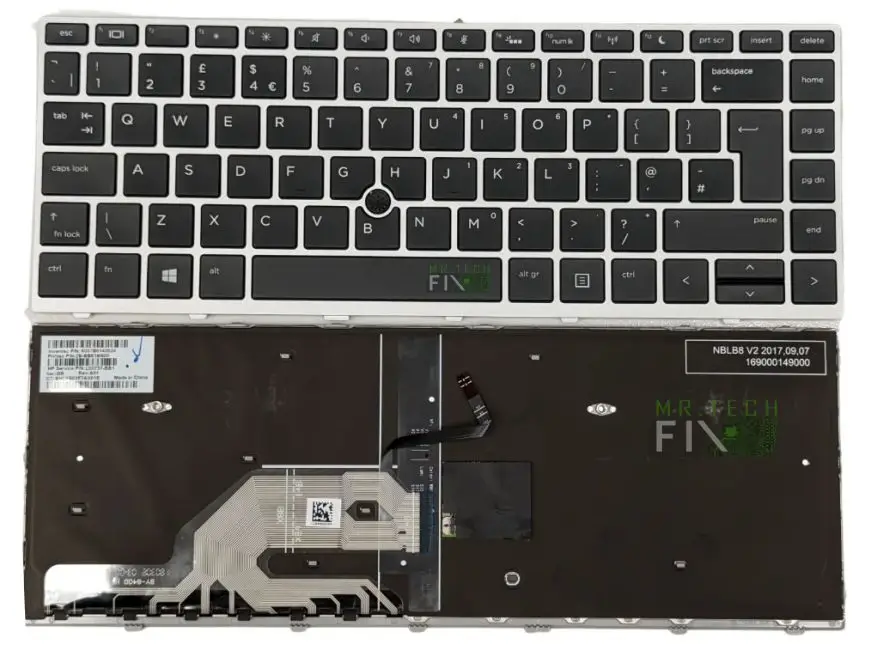
HP Notebook 640 G5 Keyboard
KSh2,800.00
-
Brand-new replacement keyboard for HP Notebook 640 G5
-
U.S.A QWERTY alpha-numeric layout for accurate, comfortable typing
-
Strong black keys with durable silver frame
-
Top-fit mounting design for perfect, secured with screw holes
-
Ideal for fixing broken, missing, or unresponsive keys
-
Smooth and quiet key press for productivity
-
Free professional installation included
Description
HP Notebook 640 G5 Keyboard Replacement U.S.A Format Top-Fit Keyboard
When your laptop keyboard stops working properly, typing becomes slow, stressful, and sometimes impossible. This HP Notebook 640 G5 Keyboard is the perfect replacement designed to restore your ProBook’s typing performance back to factory standards. Whether your current keyboard has unresponsive keys, missing keys, liquid damage, or internal faults, this replacement brings your device back to full working condition.
The HP Notebook 640 G5 Keyboard features a U.S.A QWERTY alpha-numeric layout, making it ideal for office professionals, students, programmers, and everyday laptop users. Its strong black keys combined with a silver frame give your laptop a sleek, modern, and professional appearance.
Why Choose This HP Notebook 640 G5 Keyboard?
This replacement keyboard is built to OEM specifications, ensuring durability, compatibility, and long-lasting performance. Every key offers a smooth, responsive feel that makes typing comfortable and accurate.
Key Benefits:
-
✔️ 100% compatible with HP Notebook 640 G5
-
✔️ High-quality, durable key construction
-
✔️ Smooth and quiet typing
-
✔️ Elegant black + silver frame finish
-
✔️ Top-fit design ensures easy and secure installation
-
✔️ Free installation by experienced technicians
If your current keyboard suffers from issues such as sticky keys, self-typing keys, keys not working, or physical damage, this replacement is the most cost-effective and reliable solution.
Perfect Top-Fit Design for a Secure Installation
Fitted with screws holes underneath to insert screws to provide improved stability and a more secure mount. It fits neatly under the top cover, exactly as the factory-installed keyboard does.
With free installation, you don’t need to worry about opening the laptop yourself, our technicians ensure a clean, safe, and professional installation with zero risk to your motherboard or internal cables.
Comfortable Typing Experience
Typing comfort is essential, especially for users who spend long hours on a laptop. This keyboard is designed to reduce fatigue and improve accuracy with:
-
Soft, responsive keystrokes
-
Adequate key travel for better control
-
Quiet key press for office, library, and home use
-
Strong frame structure to prevent flexing
The laser-etched key characters prevent fading even after years of heavy usage.
Frequently Asked Questions (FAQ) For HP Notebook 640 G5 Keyboard
1. Is this HP Notebook 640 G5 Keyboard compatible with all 640 G5 models?
Yes. It is specifically designed for all HP Notebook ProBook 640 G5 configurations.
2. Does this keyboard include a backlight?
No. This is a non-backlit top-fit keyboard.
3. What layout does it come in?
It comes in the U.S.A QWERTY alpha-numeric layout.
4. Can I install the keyboard myself?
Installation is free, but if you prefer DIY and have technical skills, you can install it. However, professional installation is recommended to avoid damage.
5. What keyboard problems does this replacement fix? – It solves:
-
Keys not working
-
Keys typing wrong characters
-
Sticky, wobbly, or missing keys
-
Liquid spill damage
-
Self-typing or ghost typing
-
Completely dead keyboard
6. Does it come with a silver frame?
Yes, the keyboard includes a black key set with a silver outer frame, matching the original HP design.
Tips to Protect Your New HP Notebook 640 G5 Keyboard
-
Avoid drinking near your laptop to prevent spills
-
Clean regularly with compressed air and a soft brush
-
Close the lid gently to avoid damaging the keys
-
Consider using a silicone keyboard protector
-
Store your laptop in a clean, dust-free environment
-
Avoid pressing keys too hard or hitting the keyboard
Reviews
There are no reviews yet.