
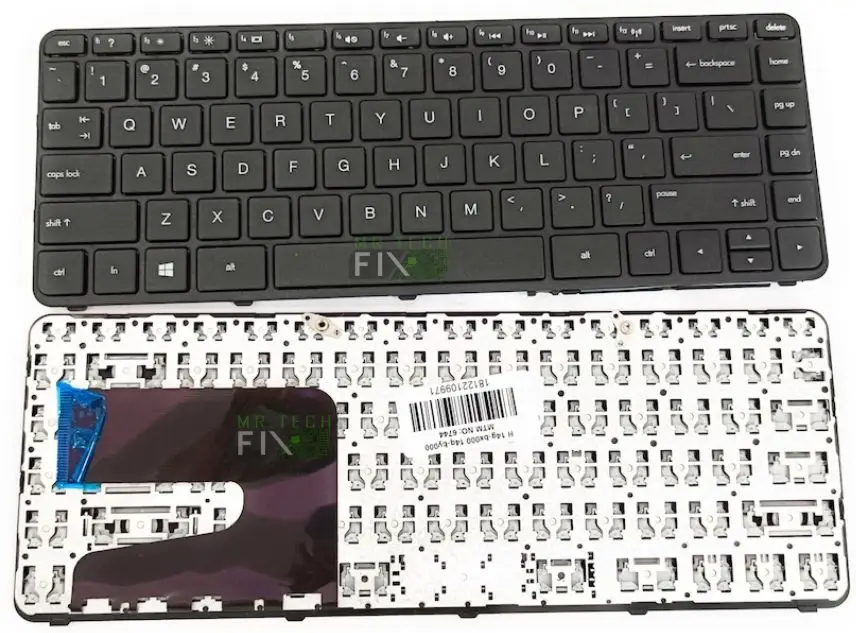
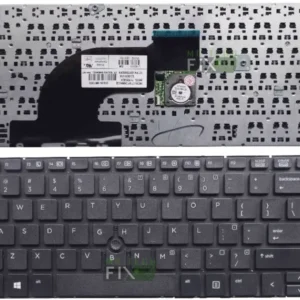
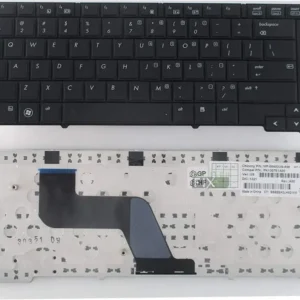
HP Notebook 240 G2 Keyboard
Compatible Model: HP Notebook 240 G2
Keyboard Type: Internal Laptop Keyboard
Layout: QWERTY Standard Layout
Color: Black
Backlight: Non-Backlit
Connection Type: Ribbon Cable (Flat Flex Cable)
Build Quality: OEM Standard Replacement
Palmrest Included: No (Keyboard Only)
Description
HP Notebook 240 G2 Keyboard – Durable Replacement Laptop Keyboard
Upgrade your typing experience with a high-quality Keyboard for HP Notebook 240 G2, designed to restore your laptop’s functionality and comfort. Whether your current keyboard has unresponsive keys, missing buttons, liquid damage, or general wear and tear, this replacement offers a reliable and cost-effective solution. Built to match the original HP specifications, it ensures seamless compatibility, smooth typing, and long-lasting performance.
A faulty keyboard can significantly slow down your productivity, making simple tasks frustrating. This replacement keyboard brings your HP Notebook 240 G2 back to life, allowing you to type efficiently whether you’re working, studying, or browsing. With its responsive keys and sturdy construction, it delivers the same feel and performance as the original keyboard that came with your laptop.
Key Features of HP Notebook 240 G2 Keyboard
⌨️ Comfortable & Responsive Typing
Enjoy a smooth and quiet typing experience with well-spaced keys and responsive feedback, ideal for long hours of use.
⚙️ Perfect Compatibility
Specifically designed for the HP Notebook 240 G2, ensuring a precise fit and easy integration with your laptop.
💪 Durable Construction
Made from high-quality materials that resist wear and tear, ensuring long-term reliability even with heavy daily use.
🔌 Plug-and-Play Replacement
Features a standard ribbon cable connection that allows for straightforward installation without complex modifications.
🖤 Sleek Original Design
Maintains the original look of your laptop with a clean black finish that blends seamlessly with your device.
Common Issues This HP Notebook 240 G2 Keyboard Fixes
- Unresponsive or stuck keys
- Missing or broken keycaps
- Keyboard not detecting input
- Liquid damage affecting typing
- Worn-out or faded keys
- Random typing errors or ghosting
Why Choose This HP Notebook 240 G2 Keyboard
This HP Notebook 240 G2 keyboard replacement is manufactured to meet OEM standards, ensuring dependable performance and a comfortable typing experience. Each unit is tested before delivery to guarantee all keys function correctly and consistently.
Replacing your keyboard is a much more affordable option compared to replacing the entire laptop. It restores full functionality and improves productivity without compromising quality. Whether you’re a student, office worker, or casual user, this keyboard provides the reliability you need.
Additionally, if you’re unsure whether your keyboard issue is caused by hardware or software, professional diagnosis can help identify the exact problem before replacement.
Installation Guidance
While experienced users can replace the keyboard themselves, it typically requires partial disassembly of the laptop. For best results and to avoid accidental damage, professional installation is highly recommended.
Where to Buy / Installation Help
Available at Mr TechFIX, your trusted laptop repair and spare parts specialist in Nairobi.
📍 Location: GMC Plaza, Shop B4, Tom Mboya Street (opposite Fire Station), Nairobi CBD
We offer:
✅ Professional keyboard replacement services
💰 Free diagnosis before repair
🔒 Pay only after your keyboard works perfectly
Our skilled technicians ensure safe installation and thorough testing, so your laptop is returned in excellent working condition.
Restore your typing speed and efficiency with a reliable HP Notebook 240 G2 keyboard replacement. Visit Mr TechFIX today or contact us to get your laptop fixed quickly and professionally!
Frequently Asked Questions (FAQs)
1. Is this keyboard compatible with HP Notebook 240 G2?
Yes, it is specifically designed for the HP Notebook 240 G2, ensuring a perfect fit and full functionality.
2. Can I install the keyboard myself?
You can if you have technical experience, but professional installation is recommended to avoid damaging internal components.
3. What problems does this keyboard replacement fix?
It resolves issues like unresponsive keys, missing keys, liquid damage, and typing errors.
4. How long does keyboard replacement take?
Typically, it takes about 1–2 hours when done by a professional technician.
5. Do you offer installation services?
Yes, installation is available at Mr TechFIX in Nairobi CBD, with free diagnosis and same-day service.
Reviews
There are no reviews yet.