Description
HP EliteBook 8440 Screen – High-Quality Non-Touch Display Solution
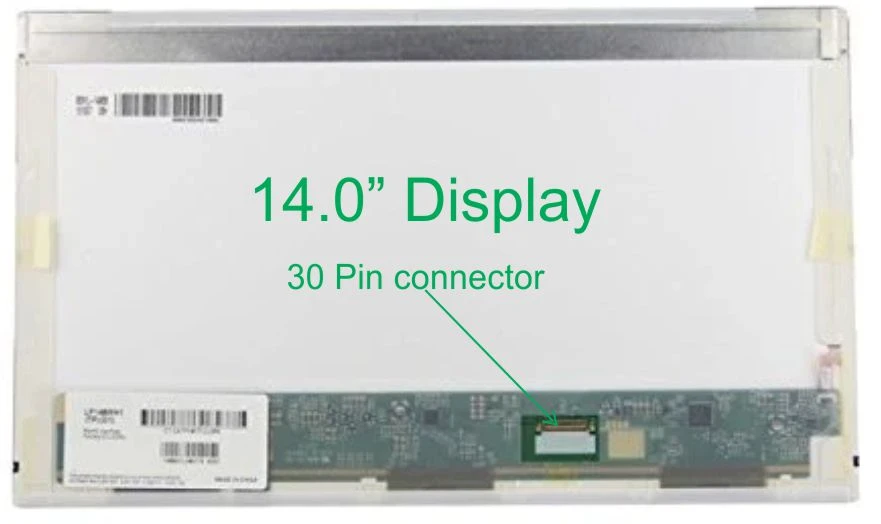
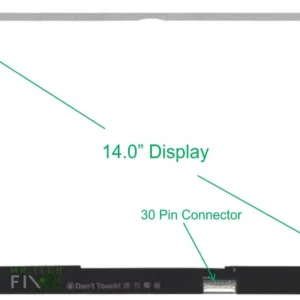
The HP EliteBook 8440 Screen is a premium non-touch LCD panel designed to meet the original factory specifications of the EliteBook 8440 series. Featuring a 14.0-inch display, this screen offers the perfect balance between workspace visibility and portability, making it ideal for professionals, students, and everyday users. With support for HD (1366×768) and HD+ (1600×900) resolution, it delivers sharp visuals, clear text, and a comfortable viewing experience for extended use.
Why Choose the HP EliteBook 8440 Screen?
HP EliteBook 8440 Screen for Crystal Clear Visuals
This screen is built with a crystal-clear LCD panel that ensures sharp image quality, vibrant colors, and consistent brightness. The super bright LED backlight improves screen visibility even in bright environments such as offices or classrooms. Whether you’re working on documents, browsing, or watching videos, the display remains clear and reliable.
HP EliteBook 8440 Screen for Professional Use
The HP EliteBook series is known for its durability and business-class performance. This replacement screen maintains those standards by delivering dependable display quality that meets professional expectations. It ensures your laptop continues to look polished and perform efficiently in any work environment.
Common Screen Problems Solved by HP EliteBook 8440 Screen
You may need to replace your HP EliteBook 8440 Screen if you experience:
- Cracked or broken screen
- Black screen while the laptop is powered on
- Flickering or dim display
- Vertical or horizontal lines
- Dead pixels or color issues
- White screen or no display output
Replacing your damaged screen restores full display functionality and enhances your overall user experience.
HP EliteBook 8440 Screen Compatibility
This screen is specifically designed for:
- HP EliteBook 8440p and 8440w laptops
- Non-touch display models
- Screens using a 40-pin connector
Using the correct screen model ensures proper compatibility, prevents display issues, and protects your laptop from potential hardware damage.
Free Installation – HP EliteBook 8440 Screen Installation in Nairobi
One of the biggest advantages of purchasing this HP EliteBook 8440 Screen from Mr TechFIX Nairobi is the free professional installation service.
Our expert technicians ensure:
- Safe removal of the damaged screen
- Thorough testing of the new screen before installation
- Proper alignment and secure fitting
- Accurate brightness, resolution, and display performance
This guarantees a smooth, risk-free replacement process with no extra labor charges.
Benefits of Replacing Your HP EliteBook 8440 Screen
Upgrading your laptop with a new screen offers several advantages:
- Restores sharp and clear display quality
- Improves productivity and reduces eye strain
- More affordable than buying a new laptop
- Maintains original laptop design and structure
- Increases the resale value of your device
This replacement screen is ideal for:
- Office and business professionals
- Students and online learners
- Freelancers and remote workers
- Home and general users
Its reliable performance makes it suitable for both work and entertainment needs.
Frequently Asked Questions (FAQs) – HP EliteBook 8440 Screen
1. How do I know if my HP EliteBook 8440 screen needs replacement?
If your screen is cracked, flickering, has lines, shows a black or white display, or has dead pixels, then it likely needs replacement. These issues cannot be fixed without changing the screen.
2. Is this HP EliteBook 8440 screen compatible with all 8440 models?
Yes, this screen is compatible with most HP EliteBook 8440p and 8440w models. However, it is important to confirm the connector type (40-pin) and resolution before installation.
3. What resolution does the HP EliteBook 8440 screen support?
The screen supports both HD (1366×768) and HD+ (1600×900) resolutions, depending on your laptop’s original specifications.
4. Do you offer installation services in Nairobi?
Yes, Mr TechFIX Nairobi offers free professional installation to ensure safe and proper screen replacement without damaging your laptop.
5. How long does it take to replace the screen?
Screen replacement typically takes 30–60 minutes when done by a professional technician.
6. Can I upgrade from HD to HD+ resolution?
In some cases, yes—but it depends on your laptop’s display cable and motherboard compatibility. Our technicians at Mr TechFIX can help confirm this before installation.
Final Thoughts on HP EliteBook 8440 Screen
If your laptop screen is damaged, dim, or malfunctioning, replacing it with the HP EliteBook 8440 Screen is the best solution. With its 14-inch display size, HD/HD+ resolution, crystal-clear LCD technology, and super bright LED backlight, it restores your laptop’s original performance and visual clarity.Combined with free installation from Mr TechFIX Nairobi, this screen replacement offers excellent value, convenience, and long-lasting reliability for your device.

Reviews
There are no reviews yet.