
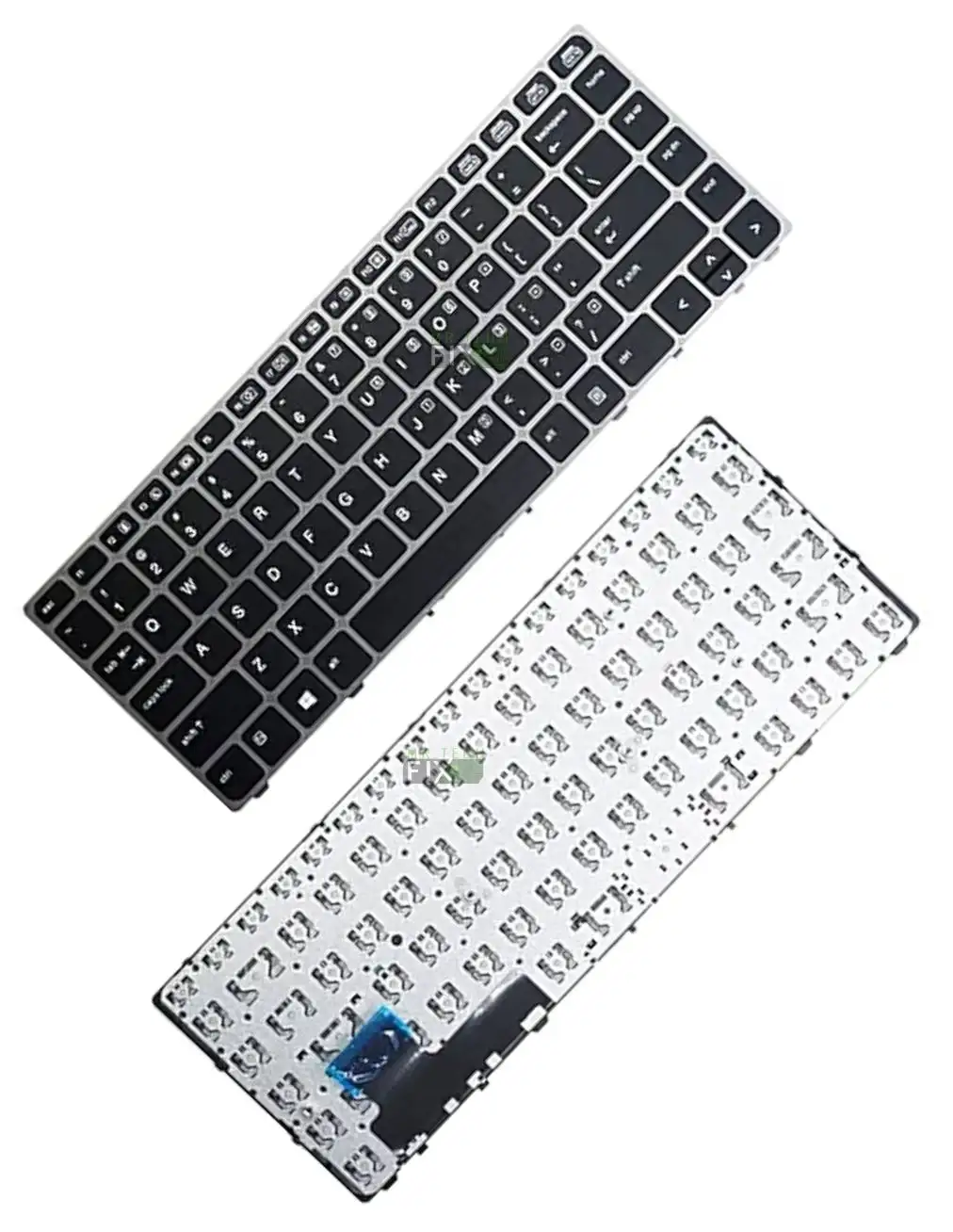
HP Folio Elitebook 9480 Keyboard
Series: EliteBook Folio
Compatible Models: 9470M / 9480M
Keyboard Type: Full QWERTY Layout
Backlight: Optional (depending on stock availability)
Color: Black with white lettering
Connection Type: Ribbon Cable (Standard OEM Fit)
Frame: With or Without Palmrest (varies by stock)
Condition: Brand New Replacement
Description
HP Folio Elitebook 9480 Keyboard – Premium Replacement Laptop Keyboard
Get a high-quality Keyboard for HP EliteBook Folio 9470m and 9480m at an affordable price to restore your laptop’s typing performance and comfort. Whether your current keyboard has unresponsive keys, worn-out letters, liquid damage, or missing keys, this reliable replacement keyboard brings your device back to life with smooth, accurate, and efficient typing.
Designed to match original factory specifications, this keyboard ensures seamless compatibility with your HP EliteBook Folio series, making it the perfect solution for professionals, students, and everyday users who rely on precision and durability.
Key Features of HP Folio Elitebook 9480 Keyboard
- Smooth & Responsive Typing:
Enjoy soft-touch keys with excellent feedback, designed for fast and accurate typing whether you’re working, studying, or browsing. - Perfect Compatibility:
Precisely engineered for HP EliteBook Folio 9470m and 9480m laptops—no modifications needed for installation. - Durable Build Quality:
Made from high-grade materials that resist wear and tear, ensuring long-term performance even with heavy daily use. - Clear Key Visibility:
Bold, long-lasting key prints ensure easy visibility even after extended usage. - Easy Installation:
Simple plug-and-play design allows quick replacement by a technician or experienced user. - Optional Backlit Feature:
Some variants include backlighting, making it easier to type in low-light environments.
Common Issues This HP Folio Elitebook 9480 Keyboard Fixes
- Unresponsive or stuck keys
- Missing or broken keys
- Liquid-damaged keyboard
- Worn-out or faded letters
- Random typing errors or ghost typing
- Keyboard not detected by the system
Why Choose This HP Folio Elitebook 9480 Keyboard
This replacement keyboard meets OEM standards, delivering the same feel and functionality as the original HP keyboard. Each unit is tested for performance, ensuring every key responds accurately and consistently.
Replacing your faulty keyboard not only improves productivity but also enhances your overall laptop experience. Instead of struggling with typing errors or external keyboards, restore your laptop to its original efficiency with this high-quality replacement.
If you’re unsure about compatibility or whether your laptop requires a full keyboard assembly or just the internal keyboard, expert assistance is available to guide you before purchase.
Where to Buy / Installation Help
Available at Mr TechFIX, your trusted laptop repair and parts specialist located at GMC Plaza Shop B4, Tom Mboya Street, directly opposite the fire station in Nairobi CBD.
We offer:
Same-day keyboard replacement service
Free diagnosis before repair
Payment only after successful installation
Pick-up and delivery services available
Restore your HP EliteBook Folio keyboard to perfect working condition with a reliable, high-quality replacement installed by professionals.
📍 Visit Mr TechFIX today or call to schedule your repair!
FAQs
1. Is this keyboard compatible with both HP 9470m and 9480m?
Yes, this keyboard is specifically designed to fit both HP EliteBook Folio 9470m and 9480m models perfectly.
2. Does the keyboard come with backlight?
Some versions are backlit while others are not. Availability depends on current stock—confirm before purchase.
3. Can I install the keyboard myself?
Yes, if you have basic technical skills. However, professional installation is recommended to avoid damage.
4. What should I do if some keys are not working?
If keys are unresponsive, replacing the keyboard is usually the most effective solution.
5. How long does replacement take?
At Mr TechFIX, keyboard replacement is typically completed the same day, depending on workload and device condition.
6. Will this keyboard fix typing delays or lag?
Yes, if the issue is caused by a faulty or worn-out keyboard, replacing it will restore fast and accurate typing response.
7. Do I need to replace the entire palmrest or just the keyboard?
In most cases, only the internal keyboard needs replacement. However, some models may come as a full assembly with a palmrest depending on availability.
Reviews
There are no reviews yet.